Details
-
Type
-
Tool
-
How to get it
-
External page (no file hosted here)
-
Version
-
1.3.1
-
Compatibility
-
Xteink X4 (stock firmware and CrossPoint firmware), iOS 15+, Android 8+, Chrome/Chromium browsers, Firefox
-
Contributor
-
Chapiware
-
Submitted
-
March 25, 2026
Send to X4
About this resource
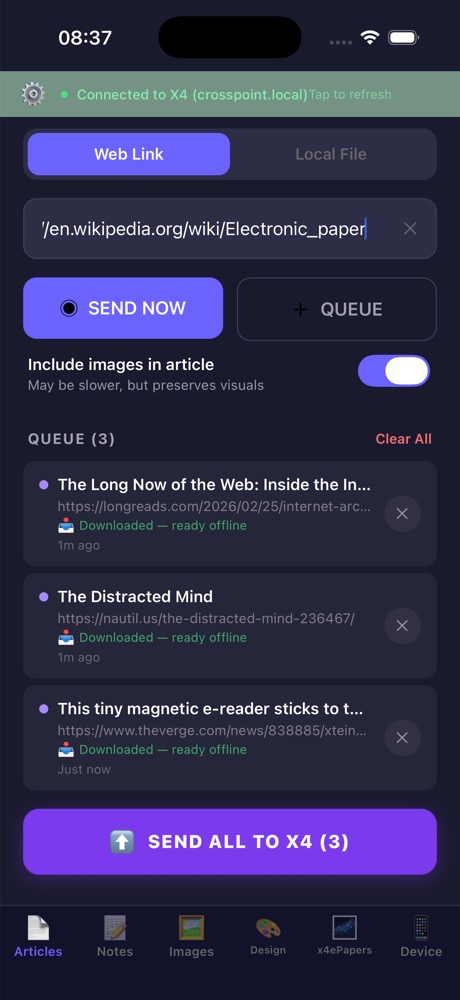
Send web articles, notes, EPUBs, and screensavers directly to your Xteink X4 over local Wi-Fi. It extracts clean long-form articles into EPUB, supports mobile share sheet sending, batch queues, notes, file management, and works without accounts or cloud services.
Installation Instructions
Mobile: install Send to X4 on iPhone or Android, connect your phone to the same Wi-Fi network as your X4 (or the X4 hotspot), then use Share → Send to X4 from your browser or app. Desktop: install the browser extension for Chrome/Chromium or Firefox, open an article, then send it directly to your X4 over local Wi-Fi.
Known Issues
Requires the phone/computer and the X4 to be on the same Wi-Fi network. Cannot bypass paywalls or extract content you cannot already view. Some features are mobile-only